
About | Download | Newsletter | System requirements | Purchase | Documentation | Version History | License agreement | Customers
About
-
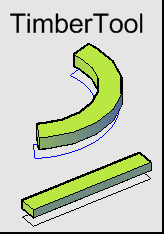 JTB TimberTool is an add-on to AutoCAD Architecture (ACA) or ADT based products including MEP and Civil 3D.
 - JTB TimberTool makes it easy to convert closed polylines into mass elements and makes the bounding box width and depth correct for scheduling purposes.
- The product was initially created for usage with timber but works with lumber, structural steel or concrete shapes.
- Style, layer, extrusion depth (or thickness) can be specified.
- Property sets can be attached automatically if they apply to mass elements.
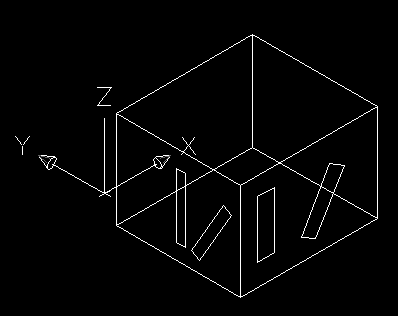
- You can manually specify the alignment axis so that rotated polylines are converted correctly.
- You can specify if you want to retain the polylines or not after conversion.
- See this short video on how it can be used.
Download

When not registered JTB TimberTool works as a free trial that is fully functional except that you can only convert three polylines per AutoCAD session. When purchased it can be used without restrictions.
Alternative download: JTB_TimberTool_3.1.0.zip
System requirements
Compatible with ADT 2007, AutoCAD Architecture 2008 to AutoCAD Architecture 2026. All flavors based on them should be working like AutoCAD MEP (AMEP, ABS) and AutoCAD Civil 3D.
Windows XP, Windows Vista, Windows 7, Windows 8, Windows 8.1, Windows 10 and Windows 11.
JTB World is an Autodesk Authorised Developer

Purchase
New license: 30 USD for one license or less depending on the quantity of licenses. Support and upgrades is included for versions released within 1 year after purchase. If Auto-Renewal is selected it is 9 USD per year and can be cancelled at anytime.
Upgrade license: 9 USD for 1 year for one license or less depending on the quantity of licenses. If Auto-Renewal is selected it is 9 USD per two years and can be cancelled at anytime.
Upgrade license: 15 USD for 2 years for one license or less depending on the quantity of licenses. If Auto-Renewal is selected it is 15 USD per two years and can be cancelled at anytime.
Once you have purchased a license, follow the instructions and email to JTB World for the license activation key. See activation instructions here: JTB World Apps Licensing.
If you have really many users that you want to give access to this software we can discuss a discounted price based on your particular situation. Educational discounts available.
The license is perpetual. If you have more than one computer and you are the only user of the application one license is enough.
The network license manager is available at no extra cost and normally most useful for companies with quite many licenses.
If your US company is tax exempt contact us directly.
2Checkout (Verifone) supports 45+ online and offline payment methods globally, but availability depends on shopper country, currency.
Main families of payment methods
-
Credit/debit cards (global core): Visa, Visa Electron, MasterCard, Maestro, Eurocard, American Express, Discover/Novus, JCB, UnionPay, plus domestic Visa/MasterCard variants in markets like Brazil and Turkey.
-
Local/regional cards: Dankort/VISA (Denmark), Bancontact (Belgium), Postepay (Italy), CB/Carte Bancaire (France), local Turkish and Brazilian cards, and other regional card schemes.
-
Digital wallets: PayPal, PayPal Express, Google Pay, Apple Pay, Alipay, WeChat Pay, MobilePay (DK), Vipps (NO), and others like Skrill, Neteller, Qiwi, WebMoney, Trustly depending on region.
-
Bank transfer & offline: Local and international bank/wire transfer (US, DE, UK, rest of world), SEPA-type transfers in EU, purchase orders, and additional local bank transfer rails in EMEA/APAC.
Documentation
Installation of the AutoCAD app
Download the app.
Run the installer.
Usage
 For the manual installation TimberTool.bmp can be used as menu command image or toolbar button image and TimberTool.png can be used as palette tool image.
When installed as an AutoCAD app start TimberTool from the Add-ins (Plug-ins) tab or use the command TIMBERTOOL.
Register
To register the software when you have purchased click on the Register button that is available when running the command TimberTool. Enter the register key you have got emailed in the text box.
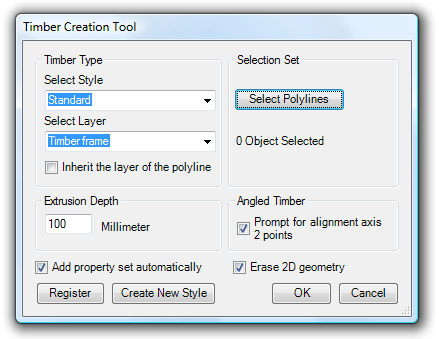
Timber Creation Tool Dialog Box
Make selection of the settings as needed.
Select the style for the mass element.
Select layer or inherit the layer of the polyline.
Specify the extrusion depth.
Add property set automatically will add any property set that applies to mass element objects.
For angled timber it can be useful to select prompt for alignment axis 2 points.
If the polyline should be deleted select erase 2D geometry.
Click on Select Polylines and select one or multiple polylines.
Press OK.
 Before conversion to mass elements |
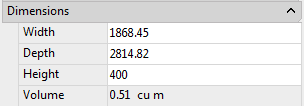
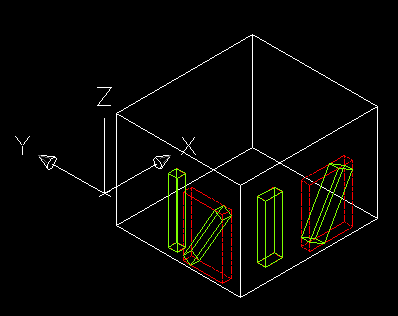 Conversion using ExtrudeLinework (notice that the bounding box is not correct. |
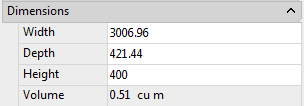
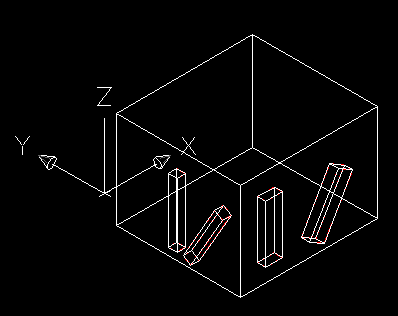 Result after using TimberTool |
|
|
Version History
- 2025-03-25 - version 3.1.0
- Support for Autodesk AutoCAD Architecture 2026.
- 2024-12-27 - version 3.0.0
- Support for Autodesk AutoCAD Architecture 2025.
- 2023-05-02 - version 2.4.0
- Support for Autodesk AutoCAD Architecture 2024.
- 2022-04-25 - version 2.3.0
- Support for Autodesk AutoCAD Architecture 2023.
- 2021-08-15 - version 2.2.0
- Fixed error when extrusion height is negative.
- Fixed display error when the screen has a display scale.
- 2021-04-13 - version 2.1.1
- Support for Autodesk® AutoCAD® Architecture 2022.
- 2020-04-10 - version 2.1
- Support for Autodesk® AutoCAD® Architecture 2021.
- 2019-03-28 - version 2.1
- Support for Autodesk® AutoCAD® Architecture 2020.
- 2018-04-11 - version 2.1
- Support for Autodesk® AutoCAD® Architecture 2019.
- 2017-04-04 - version 2.0
- Support for Autodesk® AutoCAD® Architecture 2018.
-
2015-03-28 - version 1.8
-
Support for AutoCAD Architecture 2016
-
Minor bugs fixed when entering invalid values in the dialogbox
-
-
2014-05-01 - version 1.7
-
Support for AutoCAD Architecture 2015
-
-
2013-04-13 - version 1.6 update
-
Support for AutoCAD Architecture 2014. To upgrade delete the existing TimberTool.bundle folder first.
-
-
2012-05-06 - version 1.6
-
Support for AutoCAD Architecture 2013
-
-
2009-05-17 - version 1.5
-
Support for AutoCAD Architecture 2010 added including support for 64-bit.
-
-
2007-08-10 - version 1.4
-
Alignment axis is automatically determined when possible. The longest side of a rectangle is selected as alignment axis
-
Negative extrusion depth is allowed and makes the mass element extruded the other direction.
-
The layer checkbox remembers its setting between sessions.
-
-
2007-08-05 - version 1.3
-
Inherit the layer of the polyline
-
Support for other units than millimeter
-
-
2007-07-29 - version 1.2
-
Noun-verb selection
-
Latest setting to be used as default
-
-
2007-06-12 - version 1.1
-
Add property sets
-
Works with objects located on different UCS
-
-
2007-05-20 - version 1.0
License agreement
The license agreement is found here.
Customers



Contact us for any questions, wishes or comments.