
About | Download | Newsletter | System requirements | Purchase | Documentation | Version History | License agreement | Customers
About
JTB SmartBatch (aka SmartPurger) is a batch and script utility for processing multiple DWG drawings with full control with AutoCAD, BricsCAD, ZWCAD, GstarCAD, DraftSight, NanoCAD, Graebert's ARES Commander and more.
JTB SmartBatch closes dialog boxes that might otherwise stop batch processing like for example dialog box showing missing fonts. Execute LSP or SCR files on multiple drawings. JTB SmartBatch handles crashes so the AutoCAD batch processing continues to the end and leaves bad drawings to be corrected manually. Many purge and cleanup settings available. Useful before backups and distribution of drawings. The file's modified time stamp can be restored.
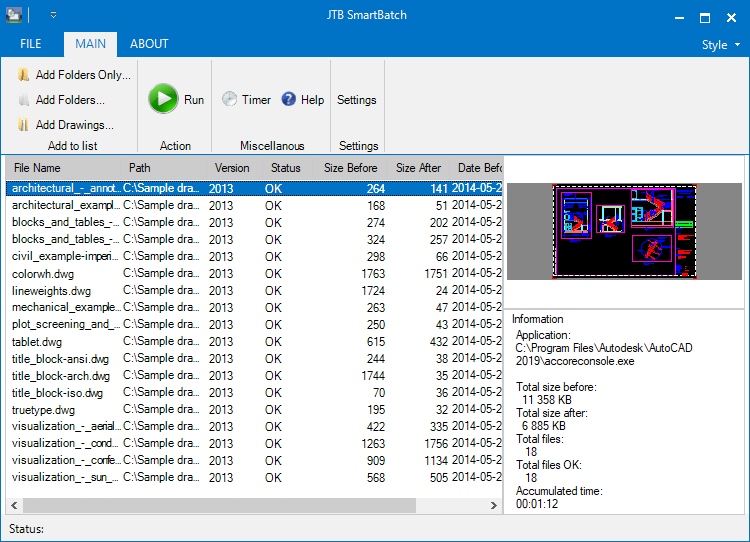
The free trial without license file is fully functional except that you can only batch process 10 drawings per session to give you the chance to confirm that the program works as expected. When you purchase you can use JTB SmartBatch with no limitations.
Batch process drawing files with JTB SmartBatch to avoid bloating or corrupt files by running AUDIT and PURGE on them or any other custom command you want.
JTB SmartBatch batch processing for AutoCAD is useful if you want to minimize the size of files before a backup or before sending drawings by e-mail, burning to CD or just to use as a quick viewer of drawings. You have options to save the files to a separate folder or to a different drawing version.
JTB SmartBatch can execute custom script files (.SCR) or AutoLISP files (.LSP, .FAS or .VLX). We can help you create them based on your special needs.
JTB SmartBatch can make use of AutoCAD Core Console that was introduced in AutoCAD 2013 making the scripting process faster then ever as the Core Console takes less than a second to open per drawing. In a test using the Core Console took 11 minutes compared to normal AutoCAD 2013 that took 58 minutes to process 145 drawings.
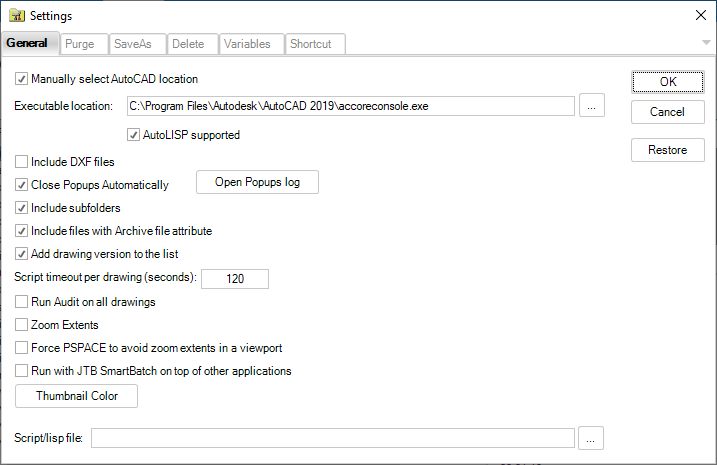
You can set up JTB SmartBatch to run different AutoCAD applications for different drawing file versions. Optionally specify the profile to be used when starting AutoCAD.
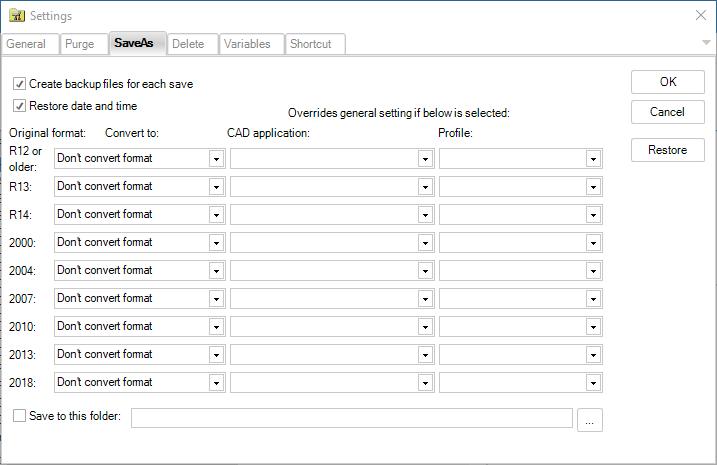
From a real project: 1773 drawings and a total size of 526MB in 2000 DWG format become 218MB in 2004 DWG format. Conversion and purging was made totally unattended. JTB SmartBatch can without problem process 10,000 drawings and more.
You can run audit, zoom extents, create preview icons. Convert between versions. Purge Blocks, Detail view styles, Dimension styles, Layers, Linetypes, Materials, Mline styles, Multileader styles, Plot styles, Regapps, Section view styles, Shapes, Text styles, Table styles, Visual styles, Page Setups, Filter states, Layer states, Layer manager states (Express Tools), Line objects without length, Text objects without text, embedded VBA code, registered applications collections, Anonymous Groups, Groups, Orphaned Data. It's possible to restore the date and time of the file to what it was before the scripting. Delete .BAK and other temporary or garbage files. And much more.
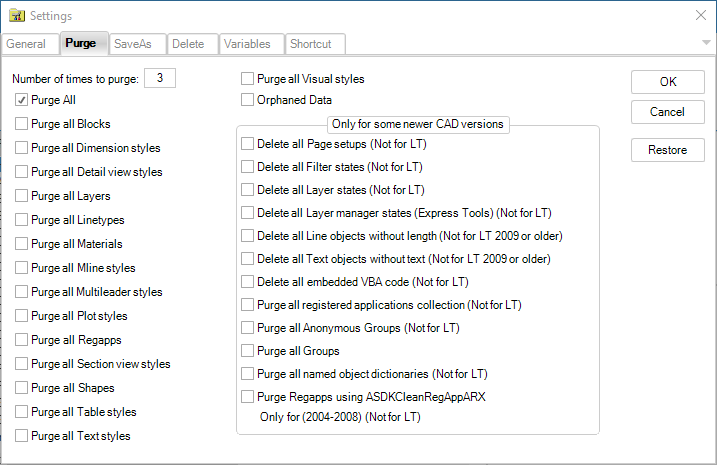
ZWCAD usage.
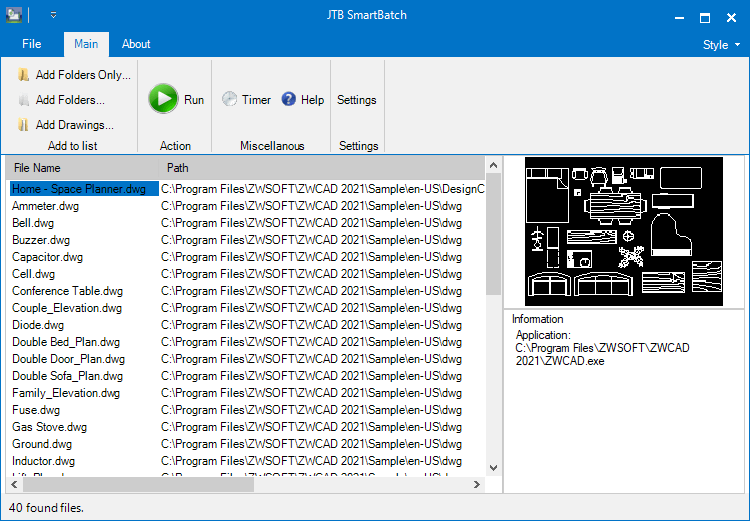
Remember that this is a very powerful tool and make sure you understand and know what you do when you use it. Read the documentation before you run it. Try on some test files/folders as a start. To be on the safe side make sure you have backups before you run.
Do you have a large list of text strings that you need to find and replace on many drawings? Contact us for a special command that can be used with JTB SmartBatch.
If AutoCAD's -PURGE command crashes AutoCAD because it runs out of memory (FATAL ERROR: Out of memory - shutting down) when purging Regapps make sure to use the purge option "Purge all registered applications collection" instead. It can take really long time (from some minutes to some hours) so set the timeout to max value (100000) and leave it running during the night. Sometimes it can help to unload the xrefs on all drawings you want to purge from Regapps otherwise they just keeps coming back (this is not needed when using accoreconsole.exe or for AutoCAD 2018 and newer if XREFREGAPPCTL is set to 0, run on both host and xrefs). Create a small lsp file with this code and run it first on all drawings.
(command "._-xref" "_u" "*")
After that you can run the files, purging the Regapps. Remember that all nested xrefs has to be run.
Then run a lsp file that loads the xrefs again using code like this:
(command "._-xref" "_r" "*")
Since release 2.6 you can use the option "Purge Regapps using ASDKCleanRegAppARX.arx (2004-2008)". Thanks to James Maeding that provided it and the ADN team that created it. This is much better than the other options "Purge all Regapps" and "Purge all registered applications collection". Layer filters too are purged with this option.
Download
Latest release is version 2026.3.0.
Limitation in trial mode is that only 10 drawings can be processed per JTB SmartBatch session.
JTB SmartBatch trial can also be downloaded from the Autodesk App Store site.

System requirements
Example of products that JTB SmartBatch can run on: AutoCAD 97 LT and newer (LT only supports a limited number of functions), AutoCAD r14 up to AutoCAD 2008, AutoCAD 2009, AutoCAD 2010, AutoCAD 2011, AutoCAD 2012, AutoCAD 2013, AutoCAD 2014, AutoCAD 2015, AutoCAD 2016, AutoCAD 2017, AutoCAD 2018, AutoCAD 2019, AutoCAD 2020, AutoCAD 2021, AutoCAD 2022, AutoCAD 2023, AutoCAD 2024, AutoCAD 2025, AutoCAD 2026, AutoCAD 2027. All flavors or toolsets should be working like AutoCAD Architecture, Autodesk Advance Steel, Autodesk AutoCAD Civil 3D, Autodesk AutoCAD Electrical, Autodesk AutoCAD Mechanical, Autodesk AutoCAD MEP, Autodesk AutoCAD P&ID, Autodesk AutoCAD Plant 3D, ACA, ADT, ABE, ABM, ABS, AMEP, LDD and MDT. 32-bit and 64-bit supported.
An AutoCAD based application is required to run JTB SmartBatch, but other DWG compatible applications like BricsCAD, GstarCAD, ZWCAD, DraftSight and AutoCAD OEM also work.
Windows 11 and Windows 10 have been tested and are supported. 32-bit and 64-bit supported. Windows Vista, Windows 7, Windows 8, Windows 8.1 are not supported but should work.

JTB World is an Autodesk Authorised Developer

Purchase
New license: 125 USD for one license or less depending on the quantity of licenses. Support and upgrades is included for versions released within 1 year after purchase. If Auto-Renewal is selected it is 32 USD per year and can be cancelled at anytime.
Upgrade license: 32 USD for 1 year for one license or less depending on the quantity of licenses. If Auto-Renewal is selected it is 32 USD per two years and can be cancelled at anytime.
Upgrade license: 60 USD for 2 years for one license or less depending on the quantity of licenses. If Auto-Renewal is selected it is 60 USD per two years and can be cancelled at anytime.
Once you have purchased a license, follow the instructions and email to JTB World for the license activation key. See activation instructions here: JTB World Apps Licensing.
If you have really many users that you want to give access to this software we can discuss a discounted price based on your particular situation. Educational discounts available.
The license is perpetual. If you have more than one computer and you are the only user of the application one license is enough.
The network license manager is available at no extra cost and normally most useful for companies with quite many licenses.
If your US company is tax exempt contact us directly.
2Checkout (Verifone) supports 45+ online and offline payment methods globally, but availability depends on shopper country, currency.
Main families of payment methods
-
Credit/debit cards (global core): Visa, Visa Electron, MasterCard, Maestro, Eurocard, American Express, Discover/Novus, JCB, UnionPay, plus domestic Visa/MasterCard variants in markets like Brazil and Turkey.
-
Local/regional cards: Dankort/VISA (Denmark), Bancontact (Belgium), Postepay (Italy), CB/Carte Bancaire (France), local Turkish and Brazilian cards, and other regional card schemes.
-
Digital wallets: PayPal, PayPal Express, Google Pay, Apple Pay, Alipay, WeChat Pay, MobilePay (DK), Vipps (NO), and others like Skrill, Neteller, Qiwi, WebMoney, Trustly depending on region.
-
Bank transfer & offline: Local and international bank/wire transfer (US, DE, UK, rest of world), SEPA-type transfers in EU, purchase orders, and additional local bank transfer rails in EMEA/APAC.
Documentation
Version History
2026-03-30 - 2026.3.0 JTB_SmartBatch_2026.3.0_installer.zip
- Added AutoCAD 2027 support.
Complete JTB SmartBatch version history here.
License agreement
The license agreement is found here.
Customers
"You provided an excellent product in “SmartPurger”. This application suits us perfectly. A powerful and multi-faceted application equals value for lower cost." - Clint Hill
More JTB SmartBatch customers here.